


SPECIFICATIONS
4KB Random Read: 91600
4KB Random Write: 71100
Application: Server,Desktop,Laptop
Brand Name: KingSpec,KingSpec
Bus Type: SATA III
Cache: None
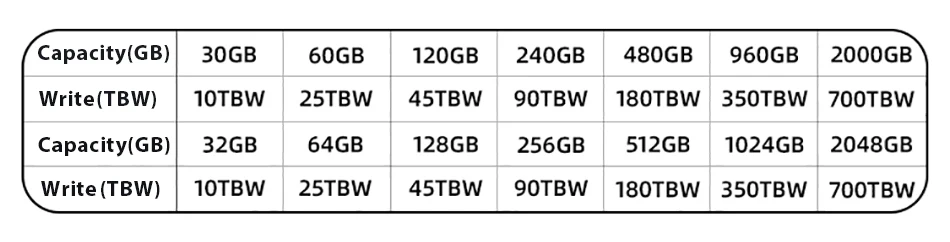
Capacity: 128GB 256GB 512GB 1TB
Certification: CE,FCC,RoHS,KC
Choice: yes
Controller: SM2246XT/INIC6081/MK8115 2.5inch SSD 2TB 1TB 512GB kingspec
Cooling Fin: No
High-concerned chemical: None
Interface Type: SATAIII
MTBF: 1 million hours
Max Sequential Read: 570
Max Sequential Write: 520
Nand Flash Type: TLC
Origin: Mainland China
Package: Yes
RGB: No
Size: 2.5"
Style: SSD
Support: wholesale price/ dropshipping
Transport Protocol: AHCI
Type: Internal,2.5 SATAIII SSD for laptop desktop

Descriptions:
Product name:2.5 inch SATA ssd
Size:100X70X7mm
Working temperature: 0℃~+70℃
Input voltage: 5V±5%
Storage temperature: -20℃~+75℃
Access time: 0.07ms
Adavantages:
※ High-quality TLC/QLC flash
※ 7mm case, easy to install in desktop/laptop computers.
※ Read Up to 550MB/s ; Write Up to 520MB/s
※ Suitable for desktops,notebooks, mini computers, all-in-ones, and other commercial PC
※ Fast reading, anti-collision and anti-vibration, low energy consumption, no noise
※ Capacity choose:120GB.240GB.256GB.512GB.
Our service:
1. We provide 3 years warranty.
2. We promised 100% refund if you don’t get the goods.
3. All the product are Original KingSpec Brand.

Package include:
1 X 2.5 inch sata ssd
1 X Package box
Note:1GB = 1000000000 bytes, due to different capacity algorithms and spare space
Reservation as well as some capacity will be occupied by storage system programs and
Performance optimization, the actual available capacity will be less than the nominal capacity.(8G≈7.3G, 16G≈14.5G, 32G≈28.6G, 64≈58G, 128G≈118G, 256G≈230.4G, 512G≈476G, 1TB≈930G, 2TB≈1870G)




Before you use:
For new SSD, please finish disk initialization according to the following steps.
1. Open Start. Search for "Create and format hard disk partitions" and click the top result to open the Disk Management console.
2. Right click "Computer" - "Manage" - "Disk Management".
Find your unallocated disk, right click "Unallocated", and choose "New Simple Volume Wizard". So then your SSD can be detected.

